How the Figma Loop Collapsed
A year ago I lived inside Figma. Now I spend 70% of my day in the terminal. Here's how the shift happened and what I still use design tools for.
March 3, 2026
When we built Quartermaster, I opened the Figma file exactly twice. Two frames — a task row and a task detail panel. Both were complex enough that I wanted to nail the component groupings before touching code. Everything else — user flows, layout decisions, visual polish — happened in Claude and in the browser.
I didn’t plan it that way. I just looked up one day and realized the file had two frames in it. For an entire product.
A few months earlier, when we built Ovii, I’d designed every screen. Onboarding, login, account setup, actor creation, scene generation, video output. Every built screen had a Figma counterpart. That was normal. That was the process I’d followed for years.
What a year looks like
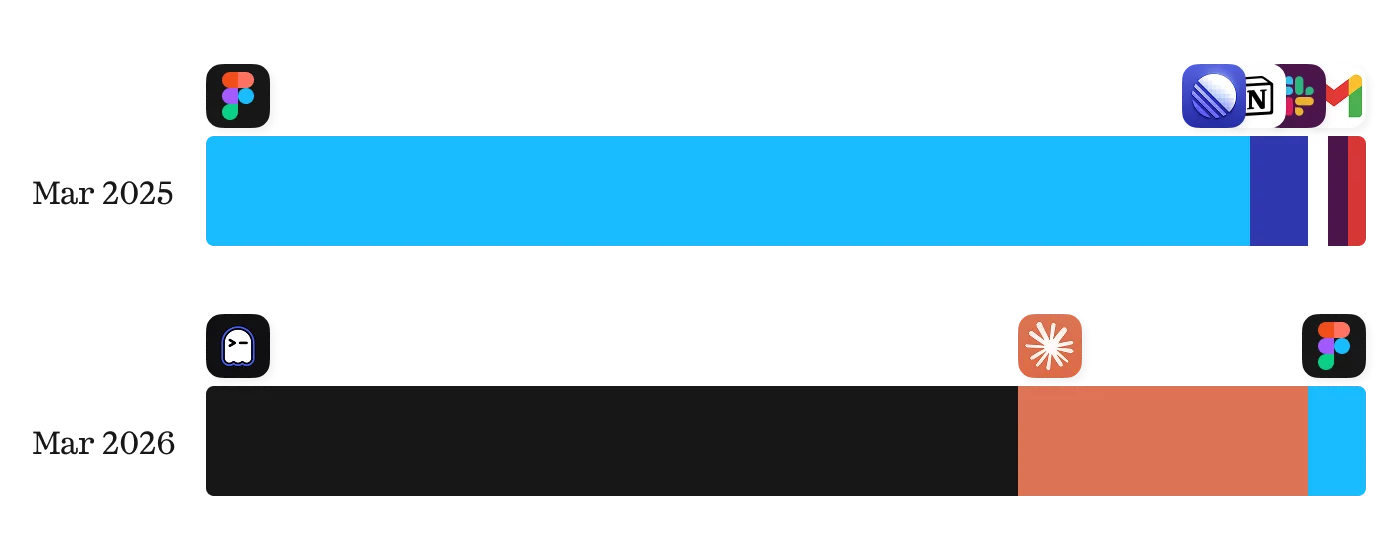
A year ago, my screen time broke down roughly like this: 90% Figma, 5% Linear, 5% everything else — docs, emails, Slack. That was a typical day. I was a designer. Figma was where designers lived.
Today it’s about 70% terminal, 20% Claude for strategy and content, 10% design tools. The terminal part would have terrified me a year ago. I had some technical chops — HTML, CSS, light JavaScript — but I wasn’t contributing code regularly. It just wasn’t what my day looked like.
A year ago, 90% of my day was Figma. Today, 70% is terminal. The shift wasn’t gradual — it was a single tool change.
The catalyst was switching from Cursor to Claude Code. That happened between Ovii and Quartermaster, and it changed everything. The moment I could directly manipulate what was shipping, working in Figma felt duplicative. I was designing something, then watching it get rebuilt in code, then going back to Figma to update the design to match what actually shipped. That loop just collapsed.
Where each task went
Here’s the honest breakdown of what moved and where:
Wireframes and prototypes went to vanilla Claude. We feed in our design system and get something that feels like the product we’re building. It’s not high fidelity, but it’s good enough to click through, find the holes, and patch them before we’ve invested real engineering time.
Visual design moved to code. This is the big one. When you can manipulate things directly in the codebase instead of relying on an engineer to implement what you designed, it changes the relationship between design and output. The design is the output.
Handoff was eliminated entirely. Josh and I work collaboratively — I’ll prototype something, he’ll make it functional, I’ll come back and polish. Or either of us will go end to end. There’s no Figma-to-Jira-to-PR pipeline because there’s no Figma to hand off from.
Asset creation is the one thing that stayed. Icons, marketing graphics, deck assets — that’s still Figma. It’s probably the biggest role Figma plays in my work today, and it’s a fraction of what it used to be.
How I actually design now
Here’s a real example. Say we’re building a landing page for a new app. The process looks like this:
First, we generate a PRD in Claude — competitive research, user pain points, feature priorities. We define the ideal customer profile and brand positioning. Then I feed all of that into vanilla Claude and get a few layout variations. I pick one, bring that code into Claude Code, and start building it in Astro.
The landing page already knows who we’re targeting, how the product is different, what features to highlight, and what the call to action should be. It isn’t until that page is mostly built that I’d hop into Figma — and only to mock up a specific graphic or icon to illustrate a specific feature.
I still sketch constantly. Paper, iPad, whatever’s nearby. But the translation path changed. Sketches used to go to Figma to code. Now they go to words to code. Most of the design execution is describing what I want and iterating live in the browser.
The thing Figma can’t do
Flagship — our mockup generator — is the clearest example of why this shift was inevitable. The core flow involves models, image generations, loading states, previews. These things are dynamic in a way that Figma is fundamentally static. You can’t design a generative tool in a static design tool. You can approximate it, but you’re lying to yourself about what the experience actually feels like.
Being able to work directly in code is the only way to accurately design that product. Not “a better way.” The only way.
The question I can’t dodge
If a designer friend told me they were spending six hours a day in Figma, I’d tell them their months in that role are limited.
That’s not diplomatic. It’s not meant to be. If I can get 90% built before your designs are even done in Figma, what’s that extra 10% worth? And if that’s what you’re banking your employment on, that’s not a lot of job security.
If I can get 90% built before your designs are even done in Figma, what’s that extra 10% worth?
I don’t say this to be harsh. I say it because I’ve spent real time helping designer friends navigate this shift — showing them the workflows, answering questions, walking through how we work. The ones who are adapting are energized. They’re building more of their vision than they ever could when their job ended at a handoff.
The scary part isn’t that the tools changed. It’s that the role changed. But the opportunity on the other side — owning more of the output, closing the gap between what you imagine and what ships — that’s what design was always supposed to be.
We just couldn’t do it before.